Let’s Get Technical: Claude Cowork Plugins vs Chat Projects
The first time you see custom plugins in Cowork, they look like a structured version of a Claude Project. The comparison only takes you so far.
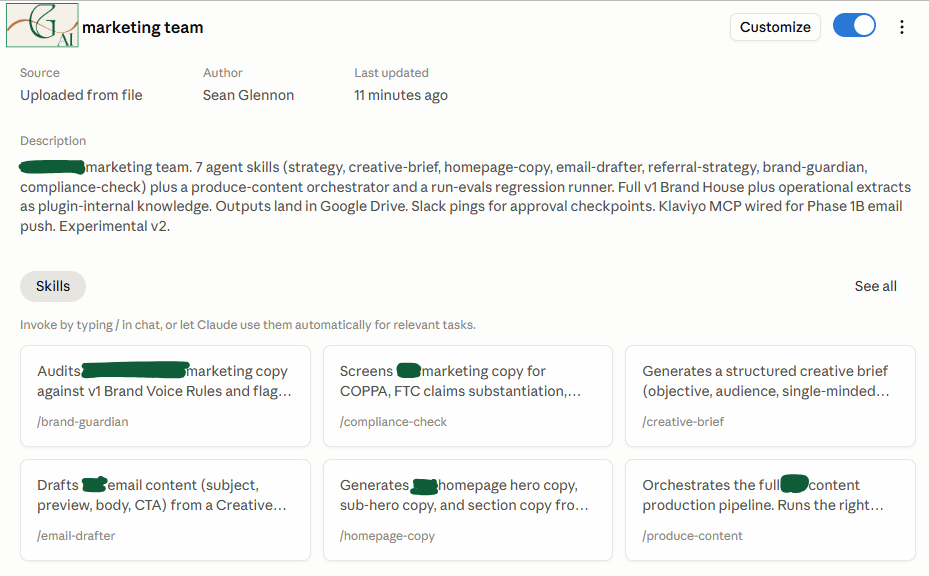
An example custom Claude Cowork plugin. I drafted this to help a client build their own in-house Agentic AI marketing team to support their real (human) marketing team focus their talents on the most valuable parts of the job (spoiler alert: it’s not checking marketing copy for brand guideline alignment).
Author AI Disclosure: This was a highly collaborative process between myself and Anthropic’s Claude (in various iterations). We built this together, but I asked Claude to write the technical details of this post because it did a better job than I could at this point in time. I share this because I make it a point not to let AI write for me. So I am disclosing the partnership for this specific post.
When I started building my first custom plugin for a client, my instinct was that it was basically a Project with more fields. Both bundle instructions and reference material so Claude behaves a certain way for your specific work. That's the resemblance. Past that, they're different kinds of objects, living in different places, doing different jobs. The core difference A Project is a customized chat workspace. One custom instructions field, a knowledge bin, conversation history. It lives in chat (web or the Chat tab of the Desktop app). Claude reads your custom instructions at the start of every conversation, has access to your knowledge files, and otherwise behaves like Claude in a chat. You talk, it answers. A plugin is a packaged set of capabilities you install into Cowork. It lives in the Cowork tab of Claude Desktop, and in Claude Code as a separate path. Cowork is a different runtime from chat. You give it a task, it goes off and works, you come back to a result. Plugins are built for that runtime. What's actually inside a plugin The structural difference shows up in how a plugin is composed. Here's the folder structure from a recent client build (Client A, marketing plugin): ``` client-a-marketing/ ├── .claude-plugin/plugin.json # the manifest ├── .mcp.json # connector wiring ├── skills/ │ ├── brand-guardian/SKILL.md │ ├── compliance-check/SKILL.md │ ├── creative-brief/SKILL.md │ ├── produce-content/SKILL.md │ └── ... (9 skills total) ├── knowledge/ # reference docs ├── scheduled-tasks/ # weekly automations └── docs/ ``` Each piece does something a Project can't do on its own. 1. Skills are the unit a Project doesn't have A Skill is a folder containing a `SKILL.md` file (YAML frontmatter with a name and description, plus Markdown instructions) and optional reference files. The mechanic that matters: Claude reads only the skill's description on every turn and decides whether to pull the rest of that skill into context. Client A's plugin has nine skills. Claude isn't loading all nine sets of instructions every time. It loads brand-guardian when you're auditing copy, compliance-check when you're checking a draft against the rules, and so on. A plugin can ship with much more material than would fit in a Project's instructions field, without bloating every conversation. 2. MCP connectors get bundled in A Project uses whatever connectors you've enabled at the account level. A plugin can declare its own in `.mcp.json`. Installing the plugin installs the connector wiring with it. For Client A, that's how Klaviyo and Shopify travel as part of the package. 3. Scheduled tasks come with the runtime Cowork has a scheduler. Chat doesn't. Client A's plugin includes three scheduled tasks (weekly strategy synthesis, weekly compliance spot-check, weekly evals run) that only exist because the plugin lives in Cowork. 4. Plugins are portable A plugin is a folder of Markdown and JSON. You can zip it, version it, push it to GitHub, hand it to a client who also has Cowork. A Project is a record inside your Anthropic account. If a client wanted the Client A plugin, I could hand them the folder. I couldn't hand them a Project. Where the comparison holds The "more structured Project" framing works in two practical senses. Both are containers for context that customize Claude for a specific job. And you'd often want both for the same engagement. The Client A setup is a Cowork plugin for the production work, with an optional parallel claude.ai Project holding the same knowledge files for mobile and ad-hoc lookups. Skills work inside Projects too, so a Skill authored as part of a plugin can also fire in chat. Stop there and the framing is fine. Where it breaks Calling a plugin a structured Project undersells what changed. A Project lives in your Anthropic account as a chat workspace. A plugin is a software package: a folder of files that Cowork knows how to install, with components (Skills, MCP config, scheduled tasks, slash commands, sub-agents) that are individually addressable and individually portable. You're shipping a small piece of software, not filling out a more elaborate form. What this changes for client builds Six months ago, the right answer for the Client A build would have been Make.com for orchestration plus the Claude API for the agent logic. Today, a Cowork plugin with Skills collapses most of the orchestration into the plugin itself. What Make.com used to orchestrate (agents, triggers, integrations), the plugin now ships with. Make.com is still a valid tool. The bar for needing it has moved. So the clean one-liner I'd give a client asking the same question: A Project customizes a conversation. A plugin packages a set of agents and the wiring they need to run.
