
‘Just Use AI’: How The AI Solutions Can Look Very Different For The Same Exact Process
In this article I’m going to show you specifically how different AI tools and techniques can be used for the same exact process. The inputs, outputs, and responsible parties change. The core components, steps, and instructions don’t. The key is identifying the actual steps of the process. Then you design how sophisticated you want the solution to be.

5 people doing the same exact process in very different ways. Created by author with Google Gemini.
As I’ve learned about the capabilities of AI, one of the ways I explain it (to myself) is that all of these different tools are just different approaches to manage the same core components of any process. There are prompts and workflows and agents and apps. There are tools galore, all packaged in their own unique way. But what they do is essentially the same. If you have a process you want managed with AI, you choose where the inputs go, what actions need to be taken, and where the output appears. That’s (basically) all there is to it.
The complicated part is knowing how to weave the AI tools and techniques together to get the right output. The hard part is identifying and defining what actually needs to be done each step of the way, regardless of whether or not you’re using AI.
To illustrate this point, let’s walk through a scenario with different approaches, but using the same inputs to get the same output. For this one, pretend you are a Resume/CV Consultant, helping candidates update their resumes to give them better odds of landing a job.
To do your job well, we need to define the inputs, outputs, and core components of your process. (Yes, there can be variations to the process but for the sake of this exercise, I’ll keep it straightforward.)
The inputs are consistent: a.) their most current resume, and b.) the job posting they are applying for.
The output is always the same: a finalized resume, tailored to the candidate and the role.
And the core components of the process never change: Update the experience and skills, tailor it to the job, make it professional and presentable.
So let’s walk through all the ways you could use AI to create a tailored resume, from least to most sophisticated (and automated).
Note: The AI tools below are the ones I personally use most often. But competitors have similar capabilities. This guide is meant to be applicable to whatever version you prefer.
Option 1: Write It Yourself
You’re a resume building expert. That’s why you have this business. You know how to do it, so you just go. You review the inputs, make an assessment based on your experience and best practices, and generate a new resume ready to go.
Absolutely nothing wrong this approach. But it doesn’t let you scale. A few resumes a day, fine. 1,000? Impossible. Now you’re turning down work, or adding cost to hire others to help.
Option 2: Prompt AI (Claude)
You take the current resume and the job posting, put it in Claude, and tell it to update the resume (“make it better and aligned to this job posting”) and make it look professional. It does the job in seconds, and the output is solid.
This is rinse and repeat. Clients are happy. You do minimal work. Is it as good as you’d do on your own? Probably not. But it’s way faster. You can keep up now.
Option 3: AI Instructions, Project Folders, and BRIEF Framework
This time you take the resume and job posting and plug it into Claude. But instead of just a general prompt, you open a chat under your specific project folder for resume building. In this folder you already have your resume building how to guide (all your tips and tricks, what you’d give a new hire you needed to train) and a reference template. The instructions in that folder say to always follow your guide and use your template. It creates a resume similar in quality to what you’d build yourself. Sometimes a little better, sometimes a tad worse, but always close and done in 60 seconds, plus however long it takes to review.
This feels like a junior consultant working for you. You have to teach it. You have to say what the right output looks like. You really should check its work and provide feedback. But it’s higher quality and fast. (If you are familiar with the BRIEF framework, that’s where this applies).
Option 4: Automated Workflows
Here’s the first big leap from what most people know how to do (prompt AI LLMs, to varying degrees of specificity) to automating most of the workflow itself. In this approach, you use a workflow automation tool like Make.com (there are many others). Based on Options 1, 2, and 3, you’ve already defined the inputs, outputs, and instructions to make the entire process flow. But you don’t want to copy and paste, and you definitely don’t want to constantly be checking your inbox or shared folder. You spend the time articulating exactly what needs to happen and then take yourself out of the manual entry chain.
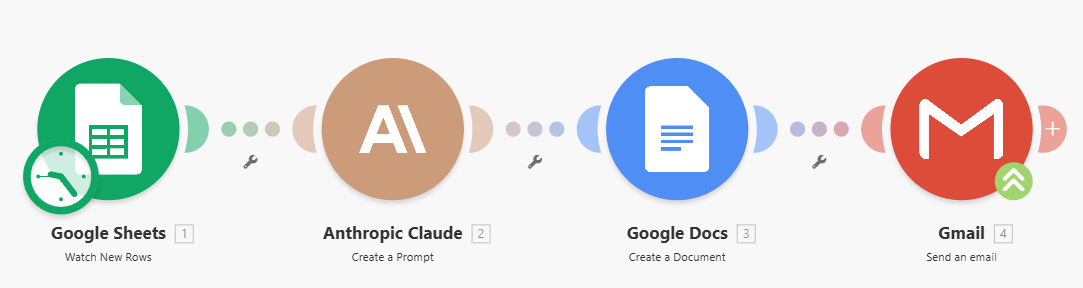
Make.com Automated Workflow: Submission → AI Review and Revision → Resume Built → Ready To Send
So you build a workflow. You start with the “trigger”. In this case, let’s say the whole thing kicks off when someone submits their request and information on your website’s Google Form. The workflow (called a “Scenario”) starts, because you told it to take action when a new submission is seen. In this case, it’s a new line added to the Google Sheet where the submissions are stored.
The workflow takes the submission data and hands it to Claude. You’ve used the BRIEF framework to teach Claude what to do. So no prompting or instructions. It’s ready to go. Claude does it’s thing, takes the inputs, follows your directions, and builds a new tailored resume.
Claude then hands it to Google again, formatting it as a Document and putting it back in the shared drive.
You get an alert that the resume draft is ready because you have a copy of it in your email’s Draft folder. You didn’t want to be out of the loop entirely, so you didn’t design the workflow to send it back to the client without your review. You are the final step.
All of this happens, again, in something like 60 seconds or less. You have eliminated the step where you watch the inbox, where you copy and paste, and where you format. The document was designed based on your explicit method and instructions, and you still have final review before hitting send.
For a repeatable, high volume process, this saves a massive amount of time.
Option 5A: Building an Internal-Facing App
The workflow requires the inputs, action, and outputs all to happen in different places. It works, but it feels like one step too many. You want it all contained in one place for yourself, so you build an app (or software solution if you want to be technical).
The app follows the same steps as the Automated Workflow. The client submits the information, AI does its thing based on your guide, and out comes the beautiful resume. But now you don’t have to check shared drives and inboxes. It all just shows up in your app, notifying you when there’s a new submission to review. Don’t like it? Send it back, with comments, in the app. And shoot it over to your client when it’s final.
No clicks through inboxes. No multiple folders and files. All of it in one place. And you still do the review yourself, being that final interface between AI and the client.
Option 5B: Build a Client-Facing App
You could even take it a step further if you feel like AI is doing a great job, and/or if you want to really scale. Have the client submit their details in the app. AI will make the new one. The client then reviews it, makes changes, provides feedback, gets a final version, and exports it themselves. They pay you a fee for each resume created. You have no part of the process because you designed it that way.
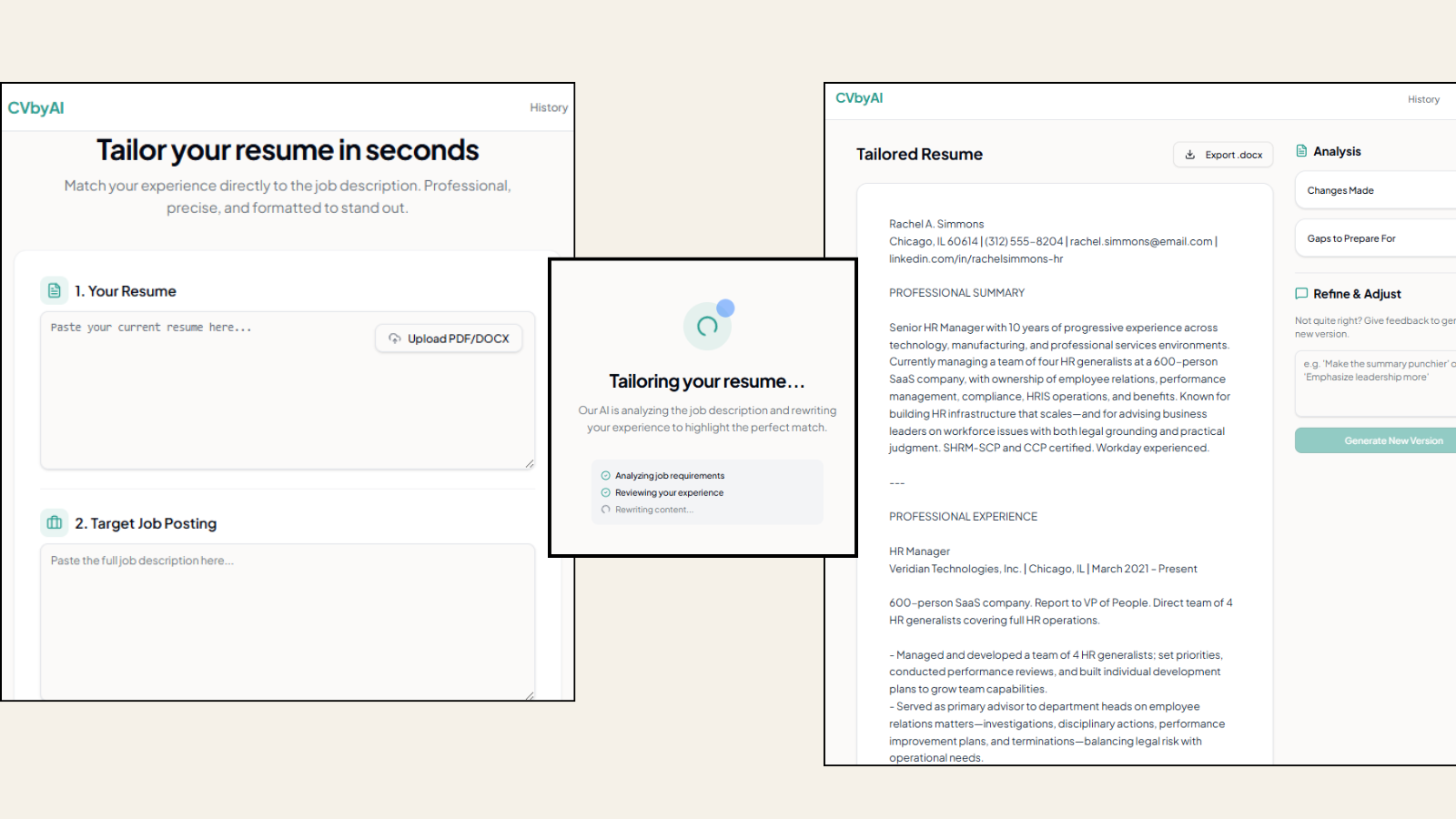
The client submits a resume and job posting, answers the optional question, watches the app work it’s magic, and has a brand new resume ready to go, including what was changed, what gaps still exist, and the option to refine in real-time. All without a human in the loop.
CVbyAI app built by author. All rights reserved and whatnot.
For many, myself included, this is a bridge too far. I don’t want a fully autonomous AI to engage directly with clients on my behalf. It’s not there yet technologically, and I’m not there personally. But, if you wanted to automate and scale a low impact process with minimal touch points, this is the way you’d do it.
I’m not recommending which approach to use. If the process doesn’t happen often, spending the time to build workflows and software doesn’t really pay off. Maybe every client is unique and you need to constantly tweak the approach. Perhaps your domain is so niche there aren’t many best practices available that you would trust AI to find. This isn’t something where I tell you what is best. But you should know what the options look like and how to get there, depending on your specific needs.
