

Building your first AI ‘agent’: A BRIEF explainer
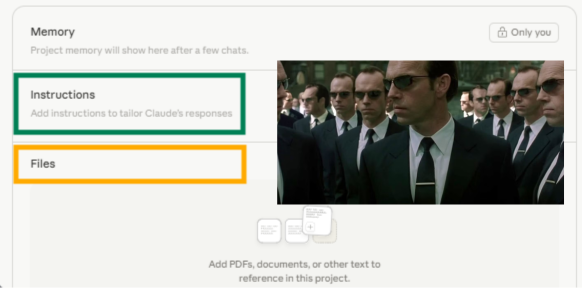
AI ‘agents’ shouldn’t be scary. And if you really look at what you’re trying to solve, an agent isn’t even the answer. Solid instructions and useful reference documents are all you need. Image created by author. Screen shot of a Claude Project and Agent Smith from The Matrix Trilogy.
By now you’ve most likely heard of AI agents. It’s been a popular topic in AI content and is typically presented as the AI solution to your business problems. Some make it sound like a super team of AI driving your business. Others essentially conflate it with decent prompting. You’ll hear a lot of related terms that make it all the more confusing (projects and GPTs and workflows and autonomous tasks, etc.) so it’s something you put on the back burner, one more thing to figure out someday, maybe.
Plus, every time I hear AI Agent I invariably think of one thing. Agent Smith.
But besides the somewhat ominous sounding name, AI agents (in their various applications) can be genuinely helpful for your business.
So let’s not call it an agent. Let’s call it your AI Helper.
Below walks through how I’ve learned and applied my AI helpers. I built a framework that I’ve written about before (The BRIEF Framework). BRIEF gives me a roadmap to articulating what I need AI to do for me, without all the errors and re-explaining. I’ll walk through how to use it for yourself, and also add a few pointers of where other AI terminology fits in (Skills and Project Instructions). And yes, the technical elements were written with the help of my AI agent. I figured who better to explain? (Note: I make it a point not to have AI write anything for me, so when I have it contribute actual written work, I make sure you know.)
How do I get started?
When you set out to build an AI helper for your business, two questions show up right away:
What do I tell it?
Where does that information go?
The BRIEF Framework answers the first question. Background, Role, Instructions, Expectations, Feedback. It's a five-part framework for explaining a job to an AI helper the same way you'd explain a job to a new hire.
The pieces below answer the second question. They name the actual containers your BRIEF goes into. You don't need to memorize them. That’s where the technical terminology throws people off. Don’t worry about that. You just need to know that when you're filling out a BRIEF, each part has a home.
Quick mapping
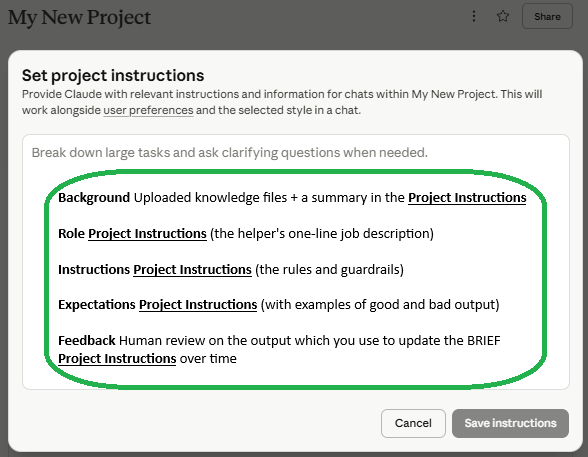
Where does each of the BRIEF elements live? Most of them live in the Project Instructions.
Background Uploaded knowledge files + a summary in the Project Instructions
Role Project Instructions (the helper's one-line job description)
Instructions Project Instructions (the rules and guardrails)
Expectations Project Instructions (with examples of good and bad output)
Feedback Human review on the output that you use to updated the BRIEF and Project Instructions over time
Most of BRIEF lives in one place: the Project Instructions text block at the top of your Claude Project, Custom GPT, or Notion AI workspace. The Background spills into uploaded knowledge files because some context is too long to paste. The Feedback piece spills into your team's process because it's about who reviews and who revises, and the insights and updates then feed into your revised BRIEF and Project Instructions.
So let’s walk through each piece and how you apply them.
Background. The context your AI needs to do the job. Customer notes, process docs, your style guide, recent emails. The big stuff (full documents) lives as uploaded knowledge files. The summary that needs to load every time lives in the Project Instructions. If you've ever uploaded a PDF and asked an AI to reference it, you've already used this. The only difference is being deliberate about which docs the helper should always have on hand.
Role. The job description for your helper. "You are the first-draft writer for weekly client update emails." One job, one helper. Lives at the top of the Project Instructions as the first sentence.
Instructions. The rules and guardrails. What language is okay. What requires human review before it goes out. What's off-limits. This is the bulk of what people write in Project Instructions, and it's where most of the work happens.
A useful distinction: if a rule applies to every task this helper does, it goes in Project Instructions. If a rule only applies to a specific kind of task ("when you're processing a meeting transcript, use this exact format"), it goes in something called a Skill, which only loads when that kind of work happens. Most clients don't need Skills for their first helper. They become useful later, when one helper handles a few related but different jobs.
Expectations. What great output looks like. This is the single highest-leverage thing you can add, and the thing most people skip. Show the AI two or three examples of output you'd accept and one or two you'd reject. Goes in Project Instructions, usually with the actual examples pasted in.
Feedback. Two things, both important.
First, a person reviews the output before it goes anywhere it can't come back from. This is called a human gate. It's deliberate, and it's what makes the system trustworthy. You decide where the gates are. Email going to a customer? Human review. Internal draft for your eyes only? Maybe not.
Second, when you see the AI making the same mistake twice, you update the BRIEF. The helper gets better because you update its instructions, not because the AI magically learns. Your BRIEF is a living document.
"Should we build an agent?"
When clients ask me to build them an agent, nine times out of ten what they actually need is a Claude Project with a strong BRIEF. That's the right answer for almost every first AI build inside a business.
A real agent (in the strict technical sense) is a system that runs on its own, makes decisions, and loops without human review. Useful for a narrow set of jobs. Risky for most. Almost never the right place to start.
The thing you're actually building first looks like this:
A Claude Project (or Custom GPT, or Notion AI workspace)
Filled in using BRIEF
With a person reviewing the output before it goes anywhere consequential
Updated by you when patterns surface
The vocabulary around it (projects, instructions, skills, agents, gates) is just naming the parts. You don't need the vocabulary to use the framework. You do need it to talk to whoever's helping you build, so you both mean the same thing.
What to do with this
When you're building your first AI helper:
Write the BRIEF first. If you can't write the BRIEF, you're not ready to build.
Pick a container. Claude Project is my default. Custom GPT, Notion AI, and others work too.
Drop your Background into the knowledge files. Drop the Role, Instructions, and Expectations into the Project Instructions text block.
Decide where the human gates are. Write them into the Instructions explicitly. "Never send directly to a client. Always show me the draft first."
Use it. Notice what it gets wrong. Update the BRIEF.
That's the whole loop. The technical vocabulary is there if you need it. But build your BRIEF for your first AI Helper and you’ll see how useful it can be.
